Required Fields in Portal
Unlike the old NFIRS model which was a static and rigid list of data points to capture on an incident, NERIS is flexible and dynamic. The NERIS model is design to capture data that is relevant for the type of incident, and the model is flexible allowing for it to evolve over time.
NERIS uses an approach called "progressive disclosure." As you answer questions, more questions may display, and more fields may become required. This experience is similar to a "Choose Your Own Adventure" book, where each answer you provide enables other different paths you can go in documenting the incident.
In Portal, Emergent indicates required fields with a red dot
In Portal, Emergent indicates required fields with a red dot next to the field. Each tab indicates the number of outstanding required fields with a red dot that contains a number
 of required fields.
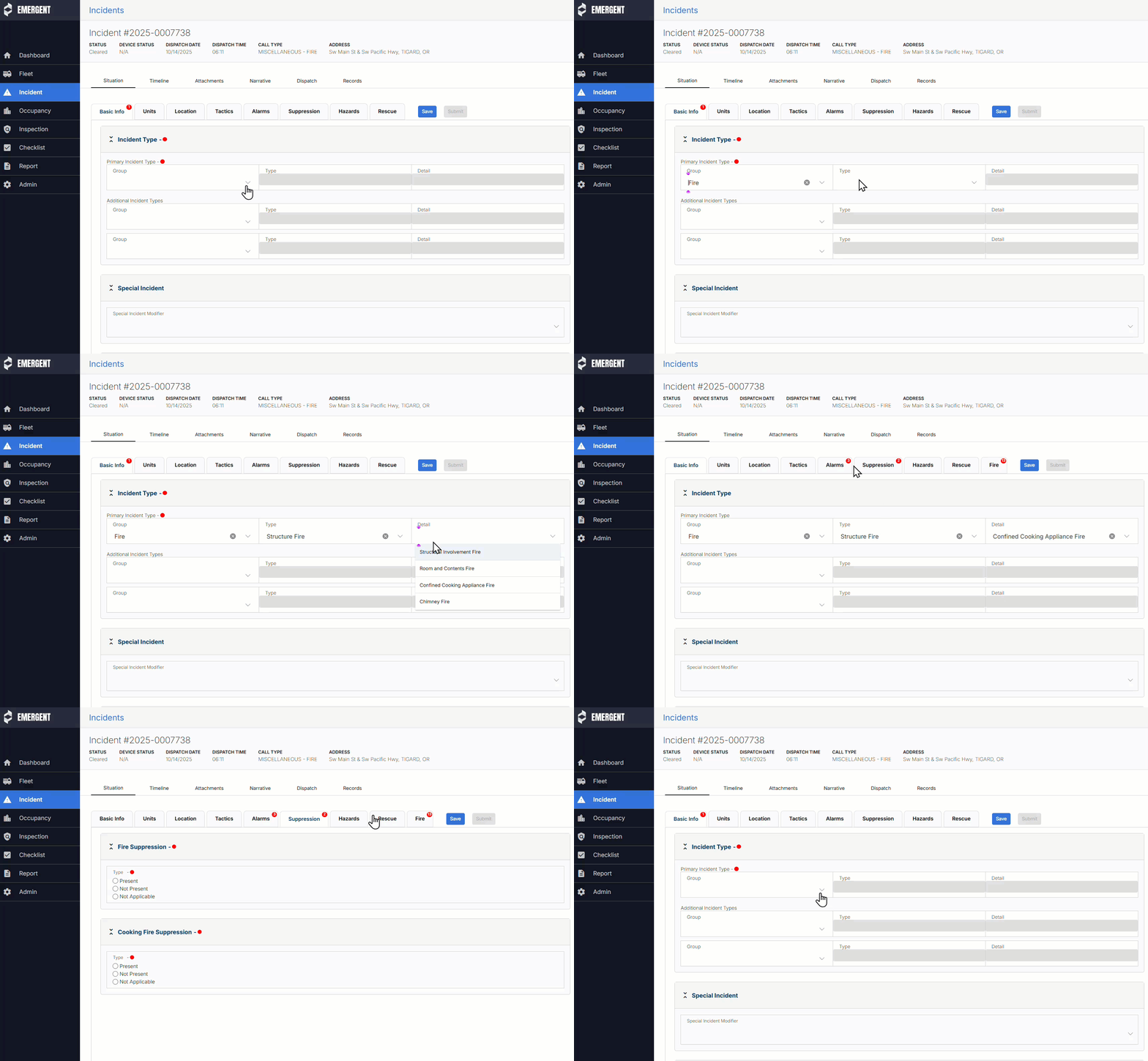
Required fields do not need to be completed before saving, however all required fields must be completed before Submitting the report to NERIS.
IMPORTANT: Users must save their changes before navigating away from the Situation tab. Navigating to another tab such as the Narrative tab without saving will result in changes being lost.
Was this article helpful?
That’s Great!
Thank you for your feedback
Sorry! We couldn't be helpful
Thank you for your feedback
Feedback sent
We appreciate your effort and will try to fix the article