Narratives on the iPad
Emergent provides multiple ways to record a unit narrative from the iPad, but it is important to remember, only the user working the Incident report from the iPad can record a narrative on the iPad. All other unit narratives must be submitted via the Portal.
A Note can be added to an incident report from any tab. The added notes will display in the Incident Narrative box along with a date and timestamp reflecting when they were captured.
Users can also add a narrative directly from the Narrative tab. Here the notes display and can be edited as needed.
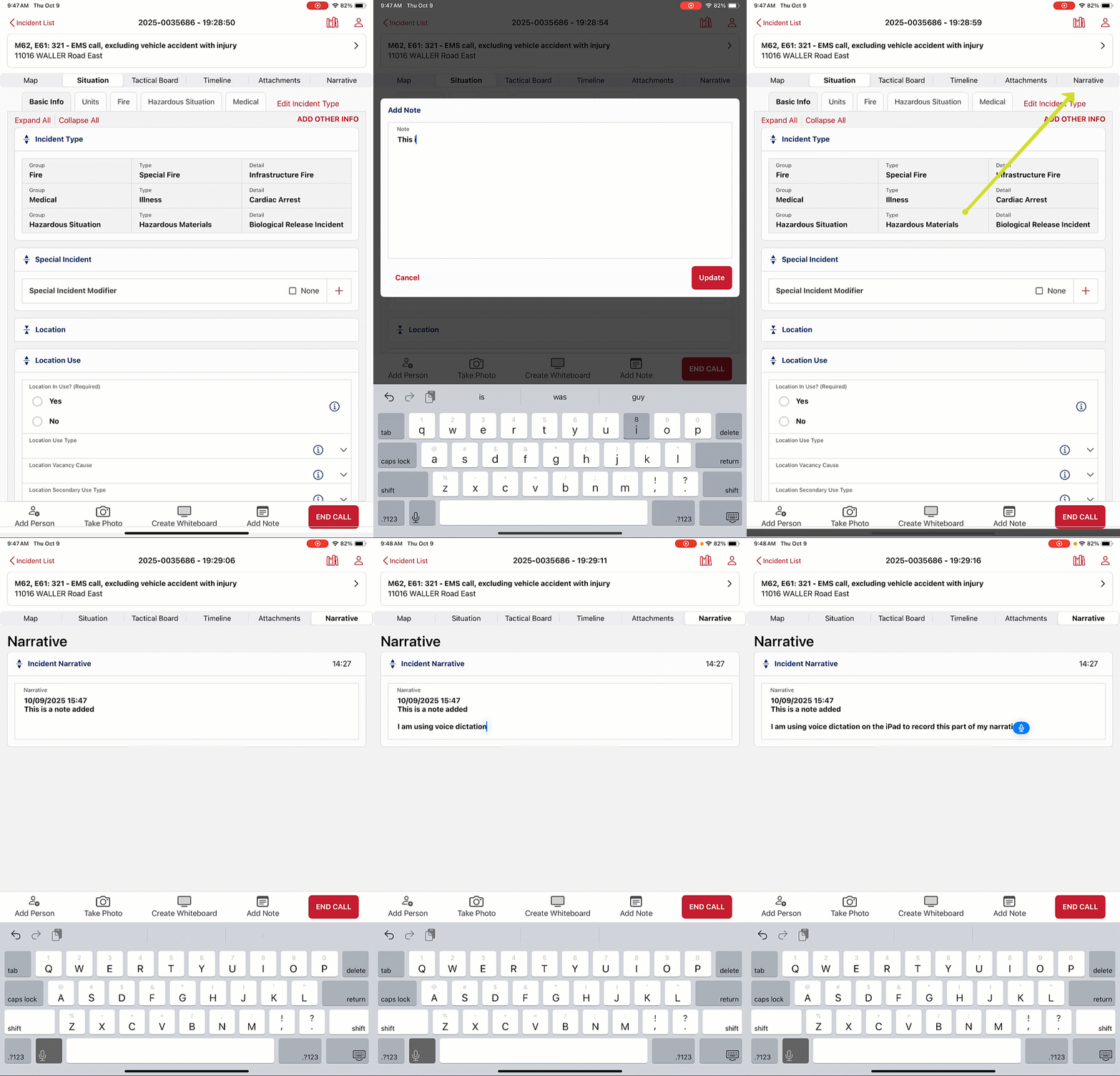
The Incident Narrative recorded on the iPad will be captured as the Unit Narrative in the Portal for the Unit associated to the user logging the iPad incident.
TIP! Apple's native dictation can be used to record both Notes and Narratives.
Was this article helpful?
That’s Great!
Thank you for your feedback
Sorry! We couldn't be helpful
Thank you for your feedback
Feedback sent
We appreciate your effort and will try to fix the article